Archive

Archive for the ‘Technology’ Category

Meet Junior…

February 6th, 2010


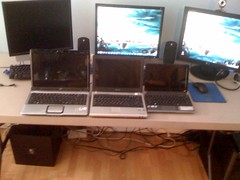
Meet Junior…

He’s there on the right next to his brothers of various ages – isn’t
he cute?

I had wanted a smaller device to use while traveling and while
watching TV (it’s fab to lookup stuff/stars/stats while watching!)

I had high hopes for the Apple iPad but the first version that came
out a few weeks ago just didn’t meet my needs or expectations (no
flash player Apple? Come on now…that’s just dumb no matter what)

So I finally got a "netbook" – and it’s pretty neat. One inch thick
and about 2.5 pounds. 10 inch screen running Windows 7. Intel Atom
N450 processor (the very newest Atom processor) and 2 gigs memory.
Keyboard is more useable than it looks. It’s a sweet little dealie
and performs great.

Oh, and here’s the fun part… It’s a Gateway. Yep, remember them
cows? I was going for the highest rated and reviewed HP netbook but
found this little gem that just came out while researching for the
others. The specs beat the others and price was right so I got it.
Hopefully this little guy will continue to perform.

YAY – new toys!

garrettw On the go..., Technology, geek

A decade of blogging

October 3rd, 2009

I’ve been blogging for a decade. 10 years already… huh!

While this is certainly an interesting point in a time line, it’s really only an electronic analogue to a diary. I’m sure many people have been keeping diaries for longer. Nonetheless I’m kinda tickled to meet this milestone. I started “blogging” before “blog” was even a noun or a verb; indeed before it was even a popular catchphrase. Indeed I had my first web page back in 1995 (See my “Deep Archive” link above)

That’s a lot of time and bandwidth (timewidth?) dedicated to my own banter. What have I accomplished in that time?

As it turns out quite a bit. I became a true adult (still out for some debate). I had a successful consulting company (official corporation even!) and then transferred clients/closed it after my clients became successful and got gobbled-up by other, bigger corps in what became the dot com bomb. I moved to California and back. I bought a house. Got cats. Sold a house. Bought a condo. Used five different types of blogging software. Stumbled into a great relationship. And generally observed what made me laugh and ranted upon the stuff that irritated.

As I look back at some of my entries it makes me smile and laugh a lot. Also I cringe a lot…was I THAT shrill, really? Or was I THAT stupid, really? But that’s the deliciousness of time and becoming older — the cumulative benefit of your experiences always makes you wiser and wiser.

So what will the next decade have in store? Who knows….That is what is fun, and worth living!

-Garrett

1998:
http://www.gmwnet.com/archive/1998/

1999:
http://www.gmwnet.com/archive/1999/2/
http://www.gmwnet.com/archive/1999/3/
http://www.gmwnet.com/archive/1999/

2000:

http://www.gmwnet.com/archive/2000/1/
http://www.gmwnet.com/archive/2000/2/
http://www.gmwnet.com/archive/2000/3/

2002
http://www.gmwnet.com/archive/2003/1/

2003:
http://www.gmwnet.com/archive/2003/2/

2004:
http://www.gmwnet.com/archive/2004/1/

2005:
http://www.gmwnet.com/archive/2005/1/
http://www.gmwnet.com/archive/2005/2/

2006:
http://www.gmwnet.com/archive/2006/1/

P.S.: I’m going to attempt to add these old entries to my database. So if you subscribe to the RSS feed you may see a slew of new entries. I’ll be careful to set the date in the posts properly, but I’m unsure if they will appear in the RSS feed because they are “new” entries as far as the database is concerned…

Aviation, Capitol Hill Living, Cats, ColdFusion, Downtown Living, Evert, Food, Fun!, Holiday, Holidays, Politics, Rants, Technology, The Condo, The House, Travel, Virtual Aviation, WOW!, geek

Hangin

April 25th, 2009

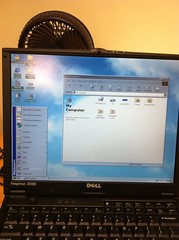
Waiting for a more modern day server project of mine to do it’s thing, I decided to play around with Virtual PC and see how old I could go back in PC time. Of course there is always DOS, but that installs fairly easily — although it took me a minute to figure out how to make MSCDEX to work in autoexec.bat & config.sys again!

I’ve previously run a Commodore 64 emulator, and that was nice, but without the software it wasn’t particularly interesting (Anyone remember GEOS?!)

No, the real fun was re-visiting those tried-and-true Windows versions I remember from College. So I whipped out my old CD drawer and what did I find

Fun!, Technology, geek

The Return of Rabbit Ears

February 23rd, 2009

I like TV. Quite a bit. I’ve been a cable or satellite user since nearly birth. It’s always given the clearest picture and tons of channels

But damn, cable and sat service is getting pricey! As I get older I’m finding I view TV less and watch movies and Internet videos more. Actual “TV” is only for live events and local news. And with KOMO and Dish Network feuding over some asinine reason (So KOMO got dropped from my sat feed) there is even less of a reason for me to partake in the whole package. The only reason I pay for cable/sat is because I thought that was the only way to get a clear signal….until know.

…Enter the digital TV switch into the proverbial picture….

So with the recent brew-ha-ha of the digital TV switch/delay/etc. I decided to just see what I could get and see what the fuss was about. Being at the top of Capitol Hill, I practically stare at the Seattle TV station broadcast antennas from my deck only 2 miles away. My plasma TV has both the old analog and new digital tuners built-in, as mandated several years ago. So having not used an antenna in decades I attached a simple 6 foot length of coax cable to my TV antenna input and had the TV search for channels…

Holy smokes!

It found them. Not only the new digital channels for all the main stations (ABC, NBC, CBS, WB, CW and some others), but it also found some of the old analog channels still broadcasting. This enabled me to do a complete side-by-side comparison.

Rarely am I impressed, but what I’m seeing on my HDTV on the digital channels (with a complete ghetto “cable” antenna nonetheless) is nothing short of amazing. I’m floored. Full HDTV and stereo surround sound on all major networks. The analog channel equivalents still come-in, but are that lovely snow-storm of interference we’ve all come to know and love, but now are glad to get rid of. It really is that spectacular. I’ve never seen reception and picture quality like this from OVER-THE-AIR broadcast in my life. The comparison is really that striking.

So now I mull some thoughts….If a 6-foot length of coax dangling from the back of my TV can get excellent DTV (and, might I add, *FREE*) reception, what could a modern little antenna pick-up? My mind is full of thoughts.

Could this be the end of a $100/month bill and the beginning of a post-modern rabbit ears revolution for me? It makes me giggle with glee.

So for all the hype it’s been given, if you live close to town, or have a good antenna, The DTV switch is totally worth it. Proven by a small, 10-minute experiment I never thought I’d do.

Capitol Hill Living, Fun!, Rants, Technology, geek

Solution to IT “off shoring”

February 15th, 2009

No need to bicker about “off shoring” in IT, we’ve been over looking a PRIME resource right here at home that will work for naps and food!

Solution to IT Helpdesk

Cats, Fun!, Technology, geek

I look like Kevin Mitnick…

July 24th, 2008

This pleases me very much in a very sinister way…

For those not in the know here’s the Wikipedia article on Kevin Mitnick, old-school cracker of the early Internet.

The best quote of that entire article (emphasis mine): “Mitnick states that he compromised computers solely by using passwords and codes that he gained by social engineering. It is notable that Mitnick did not use software programs or hacking tools for cracking passwords or otherwise exploiting computer or phone security.”

People: beware.

Fun!, Technology

Firefox is now my primary browser

June 21st, 2008

Firefox 3

As a geek-in-residence, I have about 5 different web browsers that I banter back and forth in my web surfing. Each one of them had advantages and weak spots.

So the Mozilla people released Firefox 3.0 with much fanfare this week, so of course I upgraded. I have used earlier versions and thought it was a competent browser, but wasn’t my favorite. Well, I got to give kudos — FF3, at least to me, seems so much more polished, faster and “ready”

The killer deal for me was a select set of “addons” that you can install within Firefox. These addons have become so important and complete that it’s almost like another operating system. I can do most things Internet-related within my web browser session. I use:

  • Ad Blocker Plus
  • All-in-one sidebar
  • Sage-Too for RSS feeds
  • Webmail notifier
  • Download Statusbar
  • IE Tab

IE Tab is what makes Firefox my primary browser now. Some of their sites just won’t work without it. IE Tab allows you to open a new tab/window within FF using the IE rendering engine so that all that stuff works. As a bonus you can write rules that look at URLs you click and open all such certain web addresses using IE Tab automatically. So now when I visit anything with “microsoft.com” in it, IE Tab takes over and the web pages work. Everything else Firefox handles. Nice!

Anyways, I encourage you all to give FF3 a try.

Technology

Live Seattle Air Traffic Control

November 6th, 2007

Since I moved to Capitol Hill, I’m able to receive Air Traffic Control (ATC) frequencies into Seattle’s Sea-Tac airport. In fact, I live 1,420 Ft from the imaginary airspace “intersection” that marks the start of the final approach from the north to Seattle.

So I decided to sponsor a live Internet audio stream of Air Traffic Control. You can listen to it at http://www.liveatc.net/ (click the “listen to Live ATC feeds” in the sidebar and scroll-down to “SEA Final” — there are a number of SEA feeds, actually. I’m the one with 133.65 as the only frequency)

133.65 is the final approach sector for KSEA — Seattle-Tacoma International. Busiest times seem to be around noon, 4-6PM and 8-10PM.

Seattle has 2 (soon to be 3) close parallel runways oriented north-south — named runways 16/34. You can click on the chart to the right to see a bigger image of this. When landing and departing to the south 16C is used mostly for arrivals, with 16L used for departures. When the weather is really bad or foggy they switch to the Instrument Landing System (ILS) on 16L as the ILS for 16C appears to not support bad weather CAT2/3 operations anymore because of contruction of the third runway.

In the summer, and in better winter weather, Seattle usually lands the other way to the north, using runways 34C for arrivals and 34R for departures

After-hours this frequency can be combined with one or all of the feeder arrival sectors, so you’ll hear ATC, but not pilots. Also sometimes you’ll hear some bleed-over of a Seattle radio station in the background — their main broadcast antenna is only 1 mile from me, so with it’s huge power output sometimes you’ll be stuck listening to Seattle’s best smooth jazz — sorry! Could be worse…

Here are charts and info for KSEA

Here is an airspace illustration I created of major arrival and departure routes into SEA. The triangle symbols are the major intersections along the routes (Imaginary places in the air programmed into aircraft navigation databases) The hexigonal-type symbols are actual radio navigation stations on the ground. The 3-letter acronyms you see are the codes for other radio navigation stations outside of the chart

This is far from complete, but a good intro into how traffic is sent in/out of the Seattle area.

Aviation, Capitol Hill Living, Fun!, Technology, The Condo, Virtual Aviation

I’ve travelled 70% of the way to the moon!

October 13th, 2007

Or at least that’s what this cool new website, flightmemory.com, says.

This is a website where you enter all the details of your travels and it then spits-out maps and statistics for you. I totally got into this just being lazy today. Spent hours putting in my flights and travels, all from memory.

Then you start to remember trips you forgot! Like I vividly remember flying on Delta Airlines through Cincinnati once, and Northwest via Detroit — but I can’t remember what for!

*Highly* entertaining for an aviation/travel nerd such as myself.

View my Flight memory maps and stats here!

Highlights (And I’m far from complete!):

In Miles 167,658
In Kilometer 269,821
Earth Circumnavigation 6.73 x
Distance to the Moon 0.702 x
Distance to the Sun 0.0018 x
Total Airports 53
Total Airlines 16
Total Aircraft type 28
Total Routes 106

Total Countries 8

Fun!, Technology, Travel

A terabyte at gigabit speeds

April 6th, 2007

OK, everyone and Heaven knows I’m a total dweeb. So I just got moved into my new condo (and all unpacked to boot!) and reviewed costs, finances…basically saw where the hell I was financially. Outlook was good, so I indulged and upgraded the home network. Bought a gigabit switch (nothing too terribly hip these days, but very nice) and also bought some new hard drives for my home server. I now have over a terabyte of storage, which is a moderately cool thing! I transferred a bunch of stuff from my PC to the server and…shaZAM! Wow. It copied to the server in like 5 minutes — about 200 gigs of stuff.

Me likey!

Oh, also bought some clothes for spring/summer. There are some articles of clothing I needed to retire. So I’m not a total technology hermit.

Capitol Hill Living, Technology

On my way home — early!

March 12th, 2007

OK, this stinks. So Toronto was *great* — more on it later. I am now coming home early. Air Canada was late out of Toronto because, of all things, a panel in the loo would not latch. Took them an hour to “tape it up”! So that left me precious little time in Boston to connect to my Cape Air flight to Provincetown.

So it was a race…and I lost. It seems Air Canada changed places for it’s arrivals in Boston and is now on the other side of the airport from Cape Air (because, of cousre, I researched this with zeal while planning this adventure and found both airlines used to be in the same terminal — they changed just this month!!).

So I wheeze my way up to the Cape Air ticket counter — and find out the next they could get me out was tomorrow. Guess they are unusually heavily booked. The offered to pay may way via bus (which is more than I expected, but no thanks) and seemed nice, but no-go until tomorrow. So with my time in Provincetown only 2 days anyways– what’s the point? I called American, got a seat on the next flight, so now I’m a a big, hot mess from marching all over the place, at a bar in BOS writing to the 2-3 visitors I get every day (Hi Mom, Hi Dad! :)

Sigh. I was really looking forward to Ptown — it seemed really cool and relaxing. I guess it’s all good — I get a couple days at home to chill out with the boys — I’m sure they’ll love that!

Anyways, more about Toronto soon — perhaps in the next few hours as I wait for my new flights. Toronto — wow — it’s one of those cities I must go back to.

Rants, Technology

A New Vision for ColdFusion

December 2nd, 2006

ColdFusion master Hal Helms wrote an excellent article on the future directions of ColdFusion:

A New Vision for ColdFusion

I could not agree with him more. Very rich article full of thought. I usually disagree with Hal as he’s usually so deeply technical it’s almost obscene. Not in this. Spot on, Hal!

ColdFusion programmers: read it now.

Adobe: Do it now!

And for you non-technically-aspirated the article offers some general marketing gems as well — still might be interesting.

ColdFusion, Technology

New blog software, again!

November 19th, 2006

Sorry if I ruined your links but I needed to get my blog under control. The old blog software worked well, but was a bit more complex than what I needed or desired and it still had some bugs I hadn’t been able to figure out. And it was kinda slow. And I’m a total technology dweeb, so I like to experiment — nuff said :)

I noticed that Ray Camden had made some changes to his BlogCFC program lately, which, of course, is programmed in ColdFusion which is my language of choice for web apps. So I decided to give it a try and viola! It works well, is very much faster than the old site, especially on your first visit. I lost some design control — the other blog had a great built-in rich HTML editor. But the simplicity and ease of BlogCFC captured me. Plus it’s pretty stable — not many bugs — Me likey!

So stay tuned as I tweak the format and design — and back-fill posts from the old system. For the huge masses of people who visit — Let me know how you like/don’t like. I’m sure this software can handle the 3 of you.

Technology

The iMac is a better “PC” than a PC

November 15th, 2006

I’m so impressed. I am now a complete Apple fan.

Not that I ever was a detractor of Apple — when they came out with their new operating system, OS X, that was cool. I even bought a Mac Mini to try it out. But as a sysadmin and enterprise technology geek it had limited applications for me other than as a novelty. Well, that has changed.

You might not know that Apple switched processors (the heart of any computer) from the PowerPC chip to modern Intel chips. These are the same processors that any “PC” uses. This was an incredible move on Apple’s part. Now, insofar as all Macs come with OS X, which is very good on its own of course, the new Macs can also run Windows as their operating system! So with that in mind I finally made the plunge. I bought a decent iMac to check it out to see if the hype was worth it.

I am blown away. Apple has always been very good at designing hardware. This is no exception. The iMac is a beauty. The picture you see here is it — that’s it. No big “hard drive” case. It’s all it is. A gorgeous 20 inch widescreen that contains everything. And yes, it could not be easier to install Windows XP onto any computer — I downloaded the software that makes it happen from the Apple website and within 30 miniutes I was in business, completely. And if I so choose I can reboot the computer and go into Mac OS X and do Mac stuff.

And this thing is fast — it’s noticably faster than the PC I just got 3 months ago, by a significant margin even though that PC has, by the statistics, bettter hardware. This is running Windows on Mac hardware, folks. Apple’s software installed all the drivers and things that make the PC work pretty effortlessly. And it just works. I am doing this blog entry on my new iMac, in Windows, staring at the Apple logo just beneath my screen. I have yet to run any of my high performance games, such as flight simulator, on my new iMac. I think this is where some performance may be lost. But hell, for 90% of people this is never an issue.

an interesting side note: I think Microsoft loves that Apple switched to Intel chips. They can sell more copies of Windows to Apple lovers. It’s good for Apple, too, because they can sell hardware (which is where they make their money) and entice people to become Apple-addicted. Shrewd, shrewd move for Apple.

Anyways, my advice: Buy a Mac. And a copy of Windows. You will have the best of both worlds and never look back. I am astonished it was so easy and that I didn’t do this before.

Fun!, Technology

ZoneTick is cool

September 17th, 2006

So I became addicted to this utility called ZoneTick. It’s a replacement for the windows clock that shows in the lower right corner of your screen. With this little ditty you can have multiple clocks with all different time zones displayed, and have clocks on your desktop much like Macintosh or Yahoo widgets. Since I’m an aviation freak, I’m always wanting to know what the current “zulu” time it is, which is aviation parliance for Greenwich mean time, which is the time used for all aviation matters.

There are “widgets” that do basically the same, but this utility gives you absolute control over the time/date and how you want it displayed, which others do not.

Anywhoo, I had a problem with it and their support was excellent. Timely replies via email, and I wasn’t expecting that (who does any more) So I can’t reccommend enough spending $20 and getting this nifty little utility. Nice folks. here is their website

Technology

Toshiba Gigabeat S + Windows Media 11 and URGE

September 9th, 2006

I got a new MP3 player this week. Needed something more than my 5-year-old iPOD. After a dreadful experience with a bad sync cable having to be replaced I am happy to report — this thing is awesome!

It has the new Windows Media Mobile player on it, and this plus the new Windows Media Player 11 is really a slick little package. WATCH OUT Apple! This could be the iPOD killer. iTUNES is nice, but I’ve never cared for it’s interface — and comparing it now it’s actually really staid and old looking compared to this new combination I have. Plus it effortlessly found all my pictures and videos, and synced them with the gigabeat player. Very slick.

The Toshiba gigabeat player itself is well designed — 30GB hard drive player with good connection options. You can even output to a TV and watch the videos you have on it (cables came included). Volume and sound are great, and the screen is gorgeous.

So as a part of Windows Media Player 11, they have bundled the new URGE music store, run by MTV. So I signed-up for the free trial. I have to say I’m impressed. Every obscure song I looked for they had, and then I got into the “More music like this” feature which searches for other artists and songs that are similar to what you have selected. I found more cool stuff and songs I remembered and loved that needed to be in my collection immediately! It was easy to select them, they downloaded and synced, again, flawlessly. Even with album art to boot!

After the free trial it costs you $14 a month — but it’s for all you can eat. Or you can purchase songs for $0.99 each. So I guess you could get stuck and tethered to the service if you don’t by the songs outright (which, I’m sure, is what they want). However, searching and sampling all these songs was very easy, and I’d spend the money just for the directory and searching service alone.

Anyways, enough fluff. None of this is new — others have done it before. But the entire “package” of this combination is very nice — This is good stuff. I can’t believe something like this came from Microsoft.

Fun!, Technology

Holy cow — I got comments!

August 17th, 2006

So after tweaking this website blog a bit I noticed I had comments for some of my posts! Oh shit — people ARE reading this crap. That’s funny! :) Sorry if I seemed to ignore you — I had the “moderated” type as all the bots out on the internet try to post stuff automatically and it’s all garbage. Didn’t realize this stuff was there!

Will check and see if I can get email notification when posts are made, though!!

[update 11/9/2006: with the new blog software, all the old comments went away ;( ]

Fun!, Technology

Virtual Aviation ROCKS!

February 7th, 2006


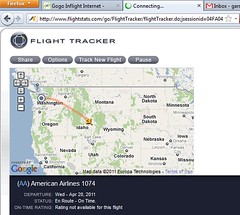
I am right now piloting a 757 from SEA to MCO (Orlando for those of you airport code challenged!) I’m just crossing into the NE corner of Wyoming. 3 hours to go!

I am amazed at what the Internet can offer (and I work with it daily!) You see, I’m not just flying flight simulator on my computer alone. I’m connected to VATSIM, a virtual aviation network. Real “virtual” human air traffic controllers are directing my flight, using voice and headsets and virtual radar just like in real life. I’m talking to Denver Center right now. In a few minutes I’ll be handed-off to Kansas City Center, just like in real life. When I get close to Orlando, Orlando Approach Control will decend and “vector” (turn) me onto the final approach course and Orlando Tower will clear me to land. All different virtual, yet real people. I hear them. I talk to them. They see me on their scopes.


I’m a member of Pacific Airways, a virtual airline. I’ve made the rank of Captain recently because of the hours I’ve flown. My Call sign is PAY1837 – “Pacific eighteen thirty seven” is how you’d hear it on the “radio”

I’m an Instrument-rated pilot, and the level of reality this brings just astounds me. What I say, What I do, the rules, etc…are almost completely in sync with what the real world does.

Is this healthy? Debatable. But I’m having fun. So what’s wrong with that, eh?!

below you can see a screenshot of the current VATSIM general status– I’m the airplane in the upper-right, traversing through Denver’s airspace now (The green Circles represent Denver Approach and Tower’s Airspace) GOD I’m a GEEK!!

Fun!, Technology, Virtual Aviation

Happy Groundhog’s Day! IE 7 Blows…

February 2nd, 2006

My favorite holiday is today! Buried rodents never get any respect, except today. Let’s give ‘em their 15 minutes of fame, shall we?

On another topic, Microsoft released a public preview of Internet Explorer 7.0 Beta. I installed it at home, and am using it to write this blog entry. So far it’s OK at home. But at work it was a disaster. Completely un-useable. I realize it’s not finished, but it was such a turd I immediately uninstalled the thing. Lots of work to do for those Microsofties on the Eastside for sure!

Fun!, Rants, Technology

Forta is Coming!

January 11th, 2006

Ben Forta, well known ColdFusion Guru, is coming to MY user group in February!

“So, big deal?” yu may ask. Ohh, but it is! Ben is about the best you can get for your user group, and always puts on a good show.

All the details are on our website: seattlecfug.com. Come one, come all!

ColdFusion, Technology

Gee, look what I found!

February 15th, 2005


So I was finally getting around to dealing with some old hardware at work. So here I was gutting and parting-out our old file server, and as I cleared the SCSI cables and hard drive shelves, but what did appear — a pair of snips! Yes, those are scissors inside our old server, that had been laying in there since we received it 4 years ago. Reminds me of those stories where doctors leave saws in people after surgery.

This server was always a bitch to me — perhaps we now know why….

Rants, Technology